Timber Tracy Bar Panel

 , (*1)
 , (*2)
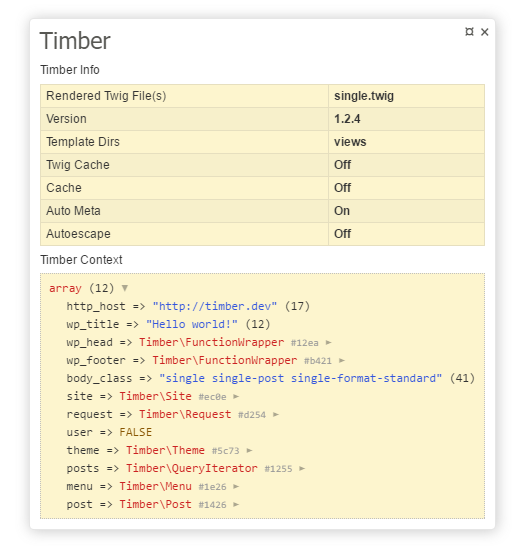
What info does it show?
This tracy panel shows info about the following:, (*3)
- Dumps the current Timber context into the same format as a Tracy BarDump
- Rendered Twig File(s)
- Version
- Template Directories
- Twig Cache
- Cache
- Auto Meta
- Autoescape
 , (*4)
Requirements:
Getting Started
Install via composer:, (*5)
composer require srt4rulez/timber-tracy-bar-panel --dev
Add composer autoload to functions.php (You are using this in a WordPress theme right?):, (*6)
require __DIR__ . '/vendor/autoload.php';
Enable tracy, then add the TimberBarPanel, like so:, (*7)
Tracy\Debugger::enable( Tracy\Debugger::DEVELOPMENT );
Tracy\Debugger::getBar()->addPanel( new srt4rulez\TimberBarPanel );
You could wrap tracy in a condition for WP_DEBUG and ! is_admin() (I've experienced uploads error when tracy was enabled on admin side), (*8)
if ( WP_DEBUG && ! is_admin() ) {

    Tracy\Debugger::enable( Tracy\Debugger::DEVELOPMENT );
    Tracy\Debugger::getBar()->addPanel( new \srt4rulez\TimberBarPanel );

}
Final functions.php:, (*9)
require __DIR__ . '/vendor/autoload.php';

if ( WP_DEBUG && ! is_admin() ) {

    Tracy\Debugger::enable( Tracy\Debugger::DEVELOPMENT );
    Tracy\Debugger::getBar()->addPanel( new srt4rulez\TimberBarPanel );

}
Thanks
License
MIT, (*10)
 Wallogit.com
