CSVImport for Laravel 5



 Speed up the process of importing initial client information into a MySQL Database-driven CMS. This package contains everything you need to start importing CSVs into your database out of the box. It is configurable and extendable to allow for complex import logic., (*1)
Requirements
- php >=5.5
- Laravel 5.1 Application
- MySQL database
- directory that is writable by the server and readable by mysql user.
Installation
Install the package, (*2)
``` bash
$ composer require rtmatt/csvimport, (*3)
Add the service provider in `config/app.php` BEFORE the application route service provider

```  php
//...
RTMatt\CSVImport\Providers\CSVImportServiceProvider::class,
//...
App\Providers\RouteServiceProvider::class,
Publish the package provider, (*4)
``` bash
$ php artisan vendor:publish --provider="RTMatt\CSVImport\Providers\CSVImportServiceProvider", (*5)
## Usage
### Basic Usage Example
#### Background
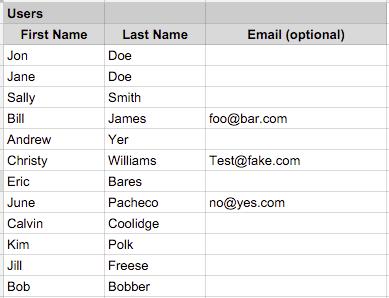
You have a database table `users` with `first_name`, `last_name`, and `email` fields. You have a csv file that reflects the following spreadsheet:
#### Step 1 - Create Importer
Create an importer. The following will create the importer stub `app/CSVImports/UsersImporter.php`
``` bash
$ php artisan csvimport:make Users
This will create the importer stub app/CSVImports/UsersImporter.php, (*6)
Configure importer stub. You will need to define the following methods., (*7)
``` php
<?php, (*8)
namespace App\CSVImports;, (*9)
use RTMatt\CSVImport\CSVImportImporter;, (*10)
class UsersImporter extends CSVImportImporter {
protected function setResourceName()
{
return "users"; //this string defines the name for files generated by the importer.
}, (*11)
protected function setTableName()
{
    return "users"; //this need to be the name of the table the importer imports into
}


protected function setFieldString()
{
    return "first_name,last_name,email"; //the corresponding database fields for each column in the csv
}
}, (*12)
#### Step 3 - Upload Importer and Run
Navigate to `/csv-imports`.  You should see an input that corresponds with the importer you made. Upload your csv and click submit.

#### Step 4 - Have a drink
You earned it.

## Configuration options
During installation, the package will create a config file `config/csvimport.php` with the following options

``` php
    'import_order'=>[],  //define order in which importers run
    'auth'=>false, // require authentication
    'sql_directory'=>'/data', // directory that csv files are written to and read from
    'override_layout_view'=> false, // override layout with custom view
    'importer_directory'=>app_path('CSVImports'), // directory in which new importers are saved
    'importer_namespace'=>"\\App\\CSVImports\\", // namespace of importers for creation and running
    'custom_route'=>false //custom route for Import manager
Import Order
If you have importers that need to run in a certain order, set this configuration option., (*13)
For example, you have the following in your importers directory:, (*14)
AffiliatesImporter.php
UsersImporter.php
UserPhotosImporter.php
If you need the UserPhotosImporter to run before the AffiliatesImporter, you would define the import_order configuration array as follows:, (*15)
``` php
'import_order'=>[
'user_photos'=>0
'affiliates'=>1
],, (*16)
-   Array key is snake_case name of your importer with 'Importer' removed
-   Array value is ascending order of operation
-   Importers that don't require ordering don't need to be included.  They will run after ordered importers have completed.

### Authentication
If you want to require authentication to access the Importers, set the `auth` config to `true`

In order to use authentication, you will need to add the following to your User model:

``` php
    public function can_import()
    {
        // your permission logic here
        // return true|false
    }
- When an unauthenticated user tries to access the import area, a Unauthorized HttpException will be thrown.
- When a authenticated user for which the can_import method returns false attempts access, a Forbidden HttpException will be thrown.
SQL Directory
You can configure the directory to which the importer writes and reads files from. This directory needs to be writable by the server and readable by the mysql user. If you override this, use an absolute path., (*17)
``` php
'sql_directory'=>'/home/users/jondoe/sql_store',, (*18)
### Override Views
If you have an admin layout that you would like the importer to load within, simply change the `override_layout_view` config to a string representing how you would load the view in a controller:


``` php
'override_layout_view'=> 'layouts.admin'
The layout will load through the package's controller. If you have layout variables or logic that are not handled properly, you will likely encounter errors., (*19)
Override Importer Directory
If you would like to store your importers anywhere other than app/CSVImports, you can do so by changing the importer_directory config., (*20)
Make sure you also update the importer_namespace config to ensure proper Importer Loading., (*21)
``` php
'importer_directory'=>app_path('IWantMyImportersHereForReasons'),
'importer_namespace'=>"\App\IWantMyImportersHereForReasons\",, (*22)
### Custom Routes
If you don't like the route `/csv-imports` and would like to define your own routes, you can do so by modifying your app's `routes.php` file with a controller route using the package's controller.


``` php
    Route::controller([your preferred route here],'\RTMatt\CSVImport\CSVImportController');
You should also set the custom_route config to true to ensure the default package routes are not registered., (*23)
Advanced Usage
There are some predefined points at which you can extend the functionality of your importers., (*24)
Override Import Command
You can completely override the MySQL command run by the importer by defining this method:, (*25)
``` php
protected function overrideImportCommand()
{
$statement = "[...]";//Your sql statement
return $statement;
}, (*26)
Example:
You are importing properties into your database.  The CSV you are working with has the following issues:
- Name column sometimes has carriage returns in it ('\r')
- The transaction_date field has a date data type, but the CSV contains a date string
- The column Property Type corresponds to a sub resource.  You need to get the id of a row in the table property_types that matches your property type name.
- The value data type is an integer, but the CSV contains '$xxx,xxx,xxx' string values.

``` php
protected function overrideImportCommand()
{
    return "load data infile '/data/properties.csv'  into table properties
           FIELDS TERMINATED BY ','
           optionally ENCLOSED BY '\"'
           ESCAPED BY '\"'
           LINES TERMINATED BY '\n'
           IGNORE 2 LINES
           (@name,city,state,@transaction_date,@property_type,description,proposition,solution,@value)
           set
           transaction_date = STR_TO_DATE(@transaction_date,'%c/%e/%Y'),
           property_type_id = (Select id from property_types where name = Replace(@property_type,'\r','')),
           value = cast((Replace(Replace(@value,'$',''),',','')) as unsigned),
           name=Replace(@name,'\r','')
           ;";
}
Post-Import Logic
Sometimes you need to run some logic after the sql statement has been executed. You do this by adding the following method to your importer:
``` php
protected function postSQLImport()
{
// post import logic here
}, (*27)
Example:
- You have a Users.csv which contains first_name and last_name columns.
- You have a full_name column in your database, and would like it to be auto-populated with the imported users' first and last names.

``` php
protected function postSQLImport()
{
    $users = \App\User::all();
    foreach($users as $user){
        $user->full_name = $user->first_name.' '.$user->last_name;
        $user->save;
    }
}
Troubleshooting
Routing Doesn't Work
You may have cached routes. Clear the route cache by running, (*28)
bash
$ php artisan route:clear
, (*29)
Photos
Currently, you need to write your own photo import logic and call it from the postSQLImport method in your importer. Photo import support is scheduled for future versions., (*30)
 Wallogit.com

 Matt
Matt