Laravel 4 Artisan Notes Management




 , (*1)
Inpired by Rails Rake notes, Laravel Notes helps you manage your notes when developing an application. It will search comment begin with TODO, FIXME, or OPTIMIZE., (*2)
Installation
- Update your composer.json to require
"rahmatawaludin/laravel-notes": "dev-master"
{
  "require": {
    "laravel/framework": "4.1.*",
    "rahmatawaludin/laravel-notes": "dev-master"
  },
  ...
}
- Run
composer update in the Terminal
- Add the LaravelNotesServiceProvider
'Rahmatawaludin\LaravelNotes\LaravelNotesServiceProvider' to the laravel providers array in the file app/config/app.php
'providers' => array(
    ...
    'Rahmatawaludin\LaravelNotes\LaravelNotesServiceProvider'
  )
Usage
Add your comment to file within app directory begin with @TODO, @FIXME, or @OPTIMIZE.
example:, (*3)
app/controllers/HomeController.php:, (*4)
...
// @TODO create different layout
...
app/routes.php, (*5)
// @FIXME missing controller for router
app/models/User.php, (*6)
/**
 * This is really important
 * @OPTIMIZE better looping for this model
 * @var string
 */
Then use notes in terminal to view all notes:, (*7)
$ php artisan notes
Options
$ php artisan notes todo
- To add custom types to the default ones
$ php artisan notes --extra-filters=foo,bar
- To search only within a directory (defaults: app)
$ php artisan notes --include-path=app/views
- To exclude a directory (defaults: storage)
$ php artisan notes --exclude-path=app/views
Under the hood
Laravel Notes will check your plataform and run grep of you are on a UNIX system. For Windows users it will use PHP to read and parse files. Non-formal tests have found that grep is 2x faster., (*8)
Screenshot
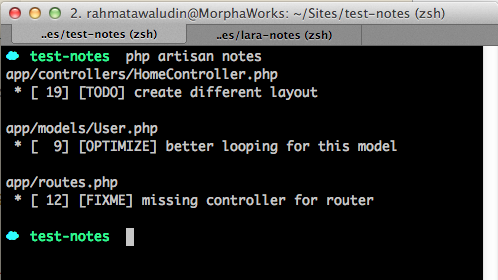 , (*9)
Roadmap
| Version |
Feature |
| ~~1.0~~ |
~~Basic viewing notes~~ |
| ~~1.1~~ |
~~Filter notes by type~~ |
| ~~1.2~~ |
~~Filter notes by custom type~~ |
| ~~1.3~~ |
~~View notes on specific directory~~ |
| ~~1.4~~ |
~~Excludes notes on specific directory~~ |
| ~~2.0~~ |
~~Improved lookup~~ |
| 2.1 |
Add --group-by-file and --group-by-type
|
| 2.2 |
Any idea? |
Contribute
- Fork
- Work on dev branch
- Pull
- Repeat.. :)
 Wallogit.com
