Laravel Adminer Database Manager
Light weight Adminer database management tool integrated into Laravel 5 and above., (*1)
Various database support: MySQL, SQLite, PostgreSQL, Oracle, MS SQL, Firebird, SimpleDB, MongoDB, Elasticsearch, and etc., (*2)
v8.0 Update
- Adminer update to v5.0.x (namespace added)
Notice: if you are using plugins, please check namespace with Adminer., (*3)
v7.2 Update
- Laravel 12.x Compatibility
- Adminer update to v4.17.1
v7.0 New Features
- Laravel 11.x Compatibility
- Adminer plugins support
v6.0 New Features
Make life easier with minimized package setup =), (*4)
- Enable laravel auto package discovery
- New config setting:
middleware (default value: auth)
- Enable env variables to setup adminer config
ADMINER_ENABLEDADMINER_AUTO_LOGINADMINER_ROUTE_PREFIX
Installation
composer require onecentlin/laravel-adminer
OR, (*5)
Update composer.json in require section:, (*6)
"require": {
    "onecentlin/laravel-adminer": "^7.0"
},
Run:, (*7)
composer update onecentlin/laravel-adminer
Register package
Laravel auto package discovery feature added since package v6.0, you may skip this step., (*8)
Update config/app.php, (*9)
'providers' => [
    ...
    Onecentlin\Adminer\ServiceProvider::class,
];
Publish config and theme file
php artisan vendor:publish --provider="Onecentlin\Adminer\ServiceProvider"
This action will copy two files and one folder:, (*10)
-
config/adminer.php - Adminer config file
-
public/adminer.css - Adminer theme file
-
resources/plugins - Adminer plugins directory
config file: config/adminer.php
<?php

return [
    'enabled' => env('ADMINER_ENABLED', true),
    'autologin' => env('ADMINER_AUTO_LOGIN', false),
    'route_prefix' => env('ADMINER_ROUTE_PREFIX', 'adminer'),
    'middleware' => 'auth',
    'plugins' => [],
];
ATTENSION: Please only enable autologin with authenticated protection., (*11)
theme file: public/adminer.css
You may download adminer.css from Adminer or create custom style, and place it into public folder., (*12)
Setup Access Permission (Middleware)
Package v6.0 allow customized middleware config, you may skip this step or modify to fit your needs., (*13)
Laravel 11 middleware setup changes
Since Laravel v11 remove Kernel.php, the middleware setup point to bootstrap/app.php, (*14)
Add your middleware group in withMiddleware section:, (*15)
return Application::configure(basePath: dirname(__DIR__))
    ->withProviders()
    ->withRouting()
    ->withMiddleware(function (Middleware $middleware) {

        // [SETUP HERE] Adminer Middleware group
        $middleware->group('adminer', [
            \Illuminate\Cookie\Middleware\EncryptCookies::class,
            \Illuminate\Session\Middleware\StartSession::class,
            \Illuminate\Auth\Middleware\Authenticate::class,
        ]);

    })
    ->withExceptions(function (Exceptions $exceptions) {
        //
    })->create();
Laravel 5.2 and above
Setup for middleware group supported for Laravel 5.2 above (~v10), (*16)
Modify config/adminer.php : 'middleware' => 'adminer',, (*17)
Modify app/Http/Kernel.php file with adminer in $middlewareGroups, (*18)
protected $middlewareGroups = [
    ...
    'adminer' => [
        \App\Http\Middleware\EncryptCookies::class,
        \Illuminate\Session\Middleware\StartSession::class,
        // TODO: you may create customized middleware to fit your needs
        // example uses Laravel default authentication (default protection)
        \Illuminate\Auth\Middleware\Authenticate::class,
    ],
];
Enable Plugins
Drop your plugin files in resources/adminer/plugins, (*19)
Modify config/adminer.php : 'plugins' => [] by adding the name of the plugin class and any argument required, (*20)
return [
    ...
    'plugins' => [
        'PluginClassNameWithoutArguments',
        'PluginClassNameWithArgument' => 'argument_value',
        'PluginClassNameWithMultipleArguments' => ['arg1', 'arg2', ...],
    ],
];
Access adminer
Open URL in web browser, (*21)
http://[your.domain.com]/adminer
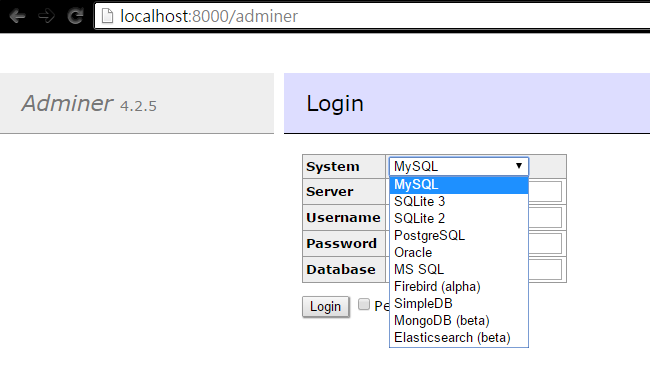 , (*22)
Due to function name conflicts of Laravel 5 and Adminer, adminer.php file
functions cookie(), redirect() and view() are prefixed with adm_ prefix., (*23)
Inspired by miroc, (*24)
 Wallogit.com
