2017 © Pedro Peláez
 

library zfdebug

image

ninja-anija/zfdebug

  • Tuesday, July 31, 2018
  • by NinjaAnija
  • Repository
  • 1 Watchers
  • 0 Stars
  • 87 Installations
  • PHP
  • 0 Dependents
  • 0 Suggesters
  • 86 Forks
  • 0 Open issues
  • 10 Versions
  • 0 % Grown

The README.md

ZFDebug - a debug bar for Zend Framework

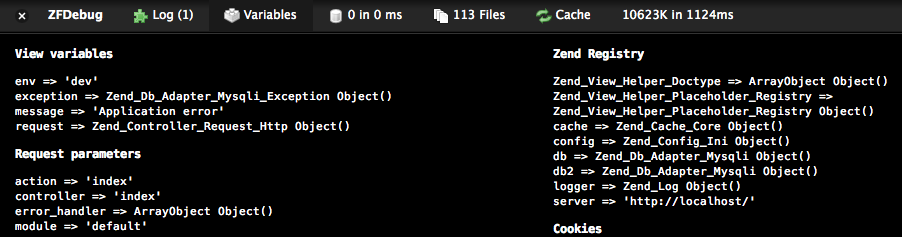
ZFDebug is a plugin for the Zend Framework for PHP5, providing useful debug information displayed in a small bar at the bottom of every page., (*1)

Time spent, memory usage and number of database queries are presented at a glance. Additionally, included files, a listing of available view variables and the complete SQL command of all queries are shown in separate panels:, (*2)

, (*3)

The available plugins at this point are:, (*4)

  • Cache: Information on Zend_Cache, APC and Zend OPcache (for PHP 5.5).
  • Database: Full listing of SQL queries from Zend_Db and the time for each.
  • Exception: Error handling of errors and exceptions.
  • File: Number and size of files included with complete list.
  • Html: Number of external stylesheets and javascripts. Link to validate with W3C. for custom memory measurements.
  • Log: Timing information of current request, time spent in action controller and custom timers. Also average, min and max time for requests.
  • Variables: View variables, request info and contents of $_COOKIE, $_POST and $_SESSION

Installation & Usage

To install, place the folder 'ZFDebug' in your library path, next to the Zend folder. Then add the following method to your bootstrap class (in ZF1.8+):, (*5)

protected function _initZFDebug()
{
    $autoloader = Zend_Loader_Autoloader::getInstance();
    $autoloader->registerNamespace('ZFDebug');

    $options = array(
        'plugins' => array('Variables',
                           'Database' => array('adapter' => $db),
                           'File' => array('basePath' => '/path/to/project'),
                           'Cache' => array('backend' => $cache->getBackend()),
                           'Exception')
    );
    $debug = new ZFDebug_Controller_Plugin_Debug($options);

    $this->bootstrap('frontController');
    $frontController = $this->getResource('frontController');
    $frontController->registerPlugin($debug);
}

Using Composer

You may now install ZFDebug using the dependency management tool Composer., (*6)

To use ZFDebug with Composer, add the following to the require list in your project's composer.json file:, (*7)

"require": {
    "ninja-anija/zfdebug": "1.*"
},

Run the install command to resolve and download the dependencies:, (*8)

php composer.phar install

Further documentation will follow as the github move progresses., (*9)

The Versions

31/07 2018

dev-deprecated-1.4.1

dev-deprecated-1.4.1

  Sources   Download

31/07 2018

dev-depreciated-1.4.1

dev-depreciated-1.4.1

  Sources   Download

31/07 2018

dev-interface-1.6

dev-interface-1.6

  Sources   Download

06/03 2018

1.5RC1

1.5.0.0-RC1

  Sources   Download

06/03 2018

1.5.4

1.5.4.0

  Sources   Download

06/03 2018

1.4.1

1.4.1.0

  Sources   Download

06/03 2018

1.5

1.5.0.0

  Sources   Download

29/07 2016

dev-master

9999999-dev https://github.com/NinjaAnija/ZFDebug

ZFDebug is a plugin for the Zend Framework for PHP5, providing useful debug information displayed in a small bar at the bottom of every page.

  Sources   Download

BSD-3-Clause

The Requires


by Avatar NinjaAnija

29/07 2016

1.6.3

1.6.3.0 https://github.com/NinjaAnija/ZFDebug

ZFDebug is a plugin for the Zend Framework for PHP5, providing useful debug information displayed in a small bar at the bottom of every page.

  Sources   Download

BSD-3-Clause

The Requires


by Avatar NinjaAnija

24/06 2014

1.6.2

1.6.2.0 https://github.com/jokkedk/ZFDebug

ZFDebug is a plugin for the Zend Framework for PHP5, providing useful debug information displayed in a small bar at the bottom of every page.

  Sources   Download

BSD-3-Clause

The Requires