 |
Archived Repository
This code is no longer maintained. Feel free to fork it, but use it at your own risks.
|
PHPCR Browser 
PHPCR Browser provides an intuitive web interface to explore and manage PHPCR repositories.
The current implementation supports Jackalope Jackrabbit and Jackalope Doctrine DBAL., (*1)
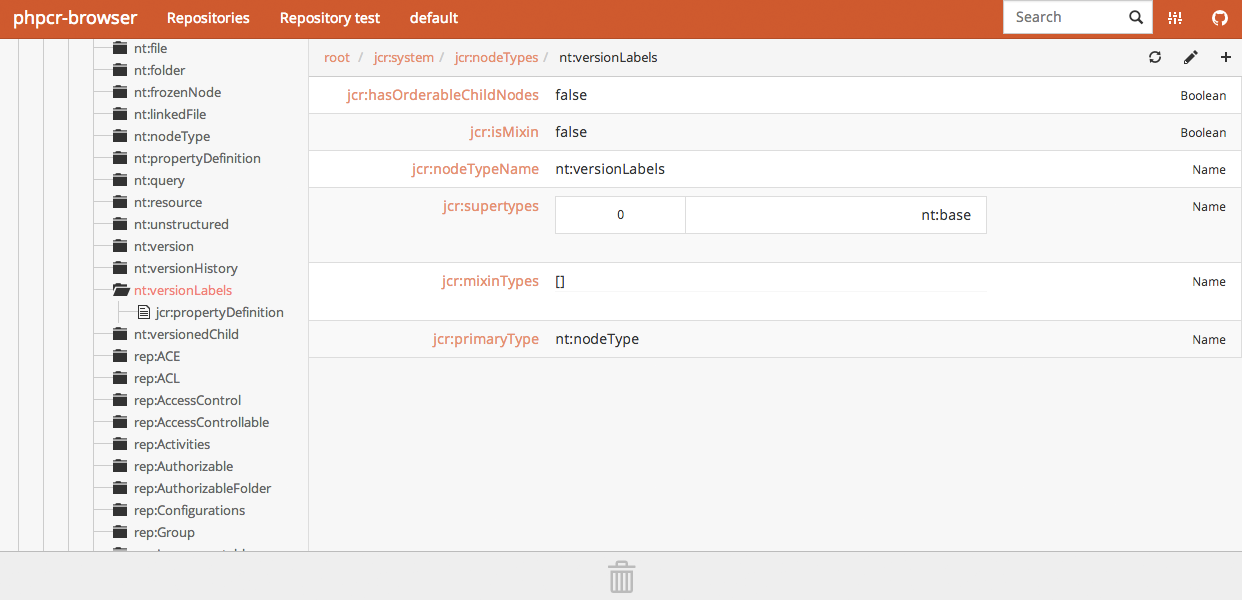 , (*2)
Supported Operations
Jackalope Jackrabbit:, (*3)
-
Workspace: create
-
Node: create, delete, move
-
Property: create, delete, update
Jackalope Doctrine DBAL:, (*4)
-
Workspace: create, delete
-
Node: create, delete, move
-
Property: create, delete, update
See marmelab/phpcr-api/config/factories.yml for more details., (*5)
Installation
PHPCR Browser uses Composer and Bower to manage its dependencies. Make sure they are globally installed before continuing., (*6)
1. Clone the repository
git clone git@github.com:marmelab/phpcr-browser.git
cd phpcr-browser
To install the web application with the default configuration (see below), run the following command:, (*7)
make install
This will download all dependencies and do the Configuration part for you. If you prefer do it on your own run:, (*8)
make install autoconfig=false
Adding support for Jackalope Doctrine DBAL (Optionnal)
By default, the Jackalope Doctrine DBAL is not installed. If you want to use it run the following commands:, (*9)
composer require jackalope/jackalope-doctrine-dbal:1.1.* --no-update
composer update jackalope/jackalope-doctrine-dbal
And update your configuration file to add your Doctrine repository by writing something equivalent to:, (*10)
'My Doctrine DBAL Repository':
        factory: jackalope.doctrine-dbal
        parameters:
            doctrine_dbal.config:
                driver: pdo_sqlite
                path: ../src/app.db
            credentials.username: admin
            credentials.password: admin
For more details on doctrine_dbal.config see Doctrine website., (*11)
You can also find this config into config/prod-with-dbal.yml.dist, (*12)
Note you can install and use both Jackalope Jackrabbit and Doctrine DBAL at the same time., (*13)
You can add as many repositories as you want into your config file., (*14)
Configuration
Create a config/prod.yml with the connection settings for the repositories you need to browse. For instance, to use the browser with a local instance of Jackalope Jackrabbit:, (*15)
phpcr_repositories:
    'My Jackrabbit Repository':
        factory: jackalope.jackrabbit
        parameters:
            jackalope.jackrabbit_uri: 'http://localhost:8080/server'
            credentials.username: admin
            credentials.password: admin
The factory setting is the type of PHPCR repository you want to browse. See available factories in marmelab/phpcr-api/config/factories.yml., (*16)
You can also copy the config/prod.yml-dist file as config/prod.yml to get this exact configuration., (*17)
For using Jackalope Doctrine DBAL refer to Installation., (*18)
Usage
Using Apache VirtualHost
Add a VirtualHost to your Apache config (and add in it 'AllowEncodedSlashes On'):, (*19)
<VirtualHost *:80>
  DocumentRoot /path/to/the/browser/web
  ServerName phpcr-browser.lo
  AllowEncodedSlashes On

  <Directory "/path/to/the/browser/web">
    AllowOverride All
  </Directory>
</VirtualHost>
And update your /etc/hosts file by adding:, (*20)
127.0.0.1 phpcr-browser.lo
You can now access to the browser on http://phpcr-browser.lo (or equivalent domain as configured in your virtual host and hosts file)., (*21)
Using PHP 5.4 integrated webserver
You can also use PHP 5.4 integrated webserver by calling:, (*22)
$ php -S localhost:8000 -t web
Alternatively call:, (*23)
$ bin/run.sh
You can now access the repository by browsing to http://localhost:8000/browser., (*24)
Tests
The PHPCR Browser AngularJS part is fully unit tested with Karma and Jasmine.
If you want to run them, install dependencies by running: make install-test, (*25)
Then run the following command: make test-spec, (*26)
Sass
The stylesheets are compiled by Compass and Sass., (*27)
If you update the sass files, run make compass-watch during development., (*28)
When your work is done, run make compass-compile before committing., (*29)
Contributing
All contributions are welcome and must pass the tests. If you add a new feature, write tests for it., (*30)
License
This application is available under the MIT License, courtesy of marmelab., (*31)
 Wallogit.com
