This package is deprecated!
Please go to https://github.com/Jimmy-JS/laravel-report-generator instead!, (*1)
Laravel - Pdf Report Generators
Rapidly Generate Simple Pdf Report on Laravel (Using barryvdh/laravel-dompdf), (*2)
This package provides a simple pdf generators to speed up your workflow, (*3)
Installation
Add package to your composer:, (*4)
composer require jimmyjs/pdf-report-generators
Then, add the ServiceProvider to the providers array in config/app.php, (*5)
Jimmyjs\PdfReportGenerators\ServiceProvider::class,
Usage
This package is make use of chunk method (Eloquent / Query Builder) so it can handle big data without memory exhausted., (*6)
Also, You can use PdfReportGenerator facade for shorter code that already registered as an alias for Jimmyjs\PdfReportGenerators\Facade class., (*7)
Example Code
use PdfReportGenerator;

public function displayReport(Request $request) {
    // Retrieve any filters
    $fromDate = $request->input('from_date');
    $toDate = $request->input('to_date');
    $sortBy = $request->input('sort_by');

    // Report title
    $title = 'Registered User Report';

    // For displaying filters description on header
    $meta = [
        'Registered on' => $fromDate . ' To ' . $toDate,
        'Sort By' => $sortBy
    ];

    // Do some querying..
    $queryBuilder = User::select(['name', 'balance', 'registered_at'])
                        ->whereBetween('registered_at', [$fromDate, $toDate])
                        ->orderBy($sortBy);

    // Set Column to be displayed
    $columns = [
        'Name' => 'name',
        'Registered At' => 'registered_at',
        'Total Balance' => 'balance',
        'Status' => function($result) { // You can do if statement or any action do you want inside this closure
            return ($result->balance > 100000) ? 'Rich Man' : 'Normal Guy';
        }
    ];

    /*
        Generate Report with flexibility to manipulate column class even manipulate column value (using Carbon, etc).

        - of()         : Init the title, meta (filters description to show), query, column (to be shown)
        - editColumn() : To Change column class or manipulate its data for displaying to report
        - showTotal()  : Used to sum all value on specified column on the last table (except using groupBy method). 'point' is a type for displaying total with a thousand separator
        - groupBy()    : Show total of value on specific group. Used with showTotal() enabled.
        - limit()      : Limit record to be showed
        - make()       : Will producing DomPDF instance so you could do any other DomPDF method such as stream() or download()
    */
    return PdfReportGenerator::of($title, $meta, $queryBuilder, $columns)
                ->editColumn('Registered At', [
                    'displayAs' => function($result) {
                        return $result->registered_at->format('d M Y');
                    }
                ])
                ->editColumn('Total Balance', [
                    'class' => 'right bold',
                    'displayAs' => function($result) {
                        return thousandSeparator($result->balance);
                    }
                ])
                ->editColumn('Status', [
                    'class' => 'right bold'
                ])
                ->showTotal([
                    'Total Balance' => 'point'
                ])
                ->limit(20)
                ->make()
                ->stream(); // or download() to download pdf
}
Note
$columns = [
    'Name' => 'name',
    'Registered At' => 'registered_at',
    'Total Balance' => 'balance',
    'Status' => function($result) { // You can do if statement or any action do you want inside this closure
        return ($result->balance > 100000) ? 'Rich Man' : 'Normal Guy';
    }
];
Will produce a same result with:, (*8)
$columns = [
    'Name' => function($result) {
        return $result->name;
    },
    'Registered At' => function($result) {
        return $result->registered_at;
    },
    'Total Balance' => function($result) {
        return $result->balance;
    },
    'Status' => function($result) { // You can do if statement or any action do you want inside this closure
        return ($result->balance > 100000) ? 'Rich Man' : 'Normal Guy';
    }
];
So you can do some eager loading like:, (*9)
$post = Post::with('comment')->where('active', 1);

$columns = [
    'Post Title' => function($result) {
        return $result->title;
    },
    'Slug' => 'slug',
    'Top Comment' => function($result) {
        return $result->comment->body;
    }
];
Output Report
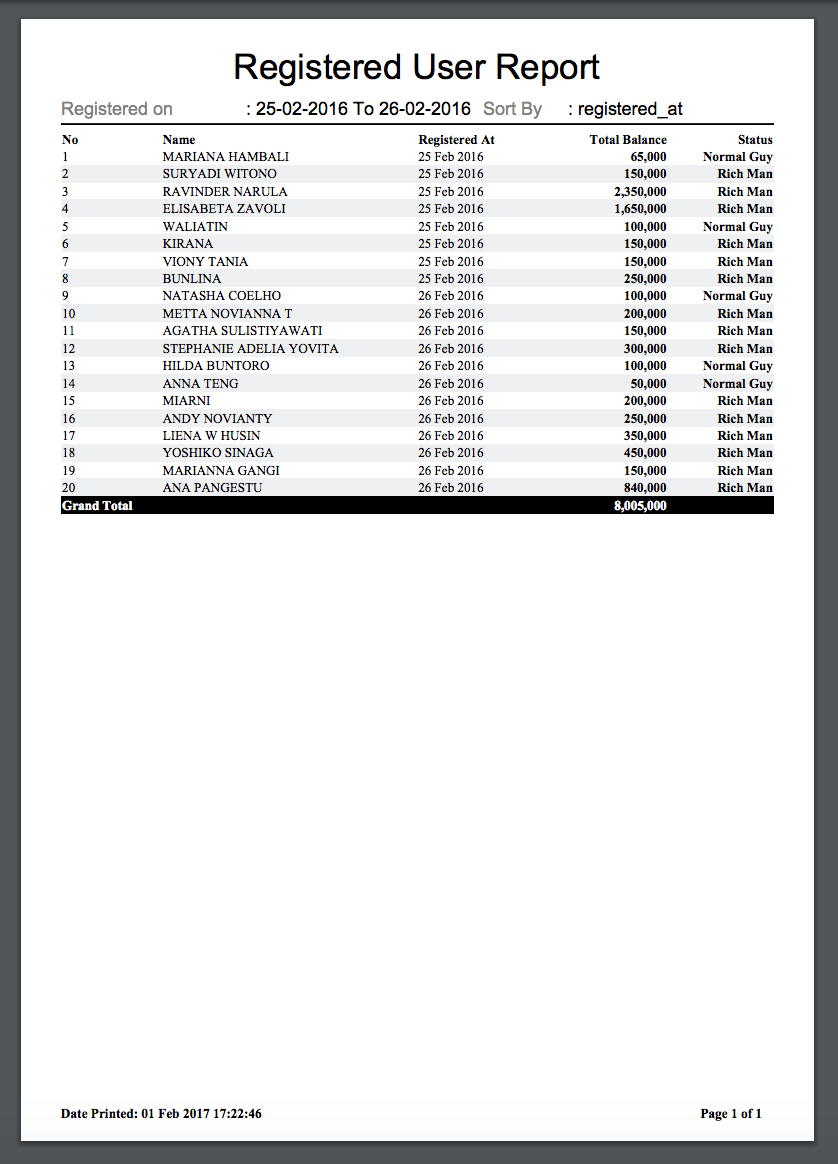 , (*10)
Example Code With Group By
Or, you can total all records by group using groupBy method, (*11)
    ...
    // Do some querying..
    $queryBuilder = User::select(['name', 'balance', 'registered_at'])
                        ->whereBetween('registered_at', [$fromDate, $toDate])
                        ->orderBy('registered_at', 'ASC'); // You should sort groupBy column to use groupBy() Method

    // Set Column to be displayed
    $columns = [
        'Registered At' => 'registered_at',
        'Name' => 'name',
        'Total Balance' => 'balance',
        'Status' => function($result) { // You can do if statement or any action do you want inside this closure
            return ($result->balance > 100000) ? 'Rich Man' : 'Normal Guy';
        }
    ];
    return PdfReportGenerator::of($title, $meta, $queryBuilder, $columns)
                ->editColumn('Registered At', [
                    'displayAs' => function($result) {
                        return $result->registered_at->format('d M Y');
                    }
                ])
                ->editColumn('Total Balance', [
                    'class' => 'right bold',
                    'displayAs' => function($result) {
                        return thousandSeparator($result->balance);
                    }
                ])
                ->editColumn('Status', [
                    'class' => 'right bold',
                ])
                ->groupBy('Registered At')
                ->showTotal([
                    'Total Balance' => 'point'
                ])
                ->make()
                ->stream(); // or download() to download pdf
PLEASE TAKE NOTE TO SORT GROUPBY COLUMN VIA QUERY FIRST TO USE THIS GROUP BY METHOD., (*12)
Output Report With Group By
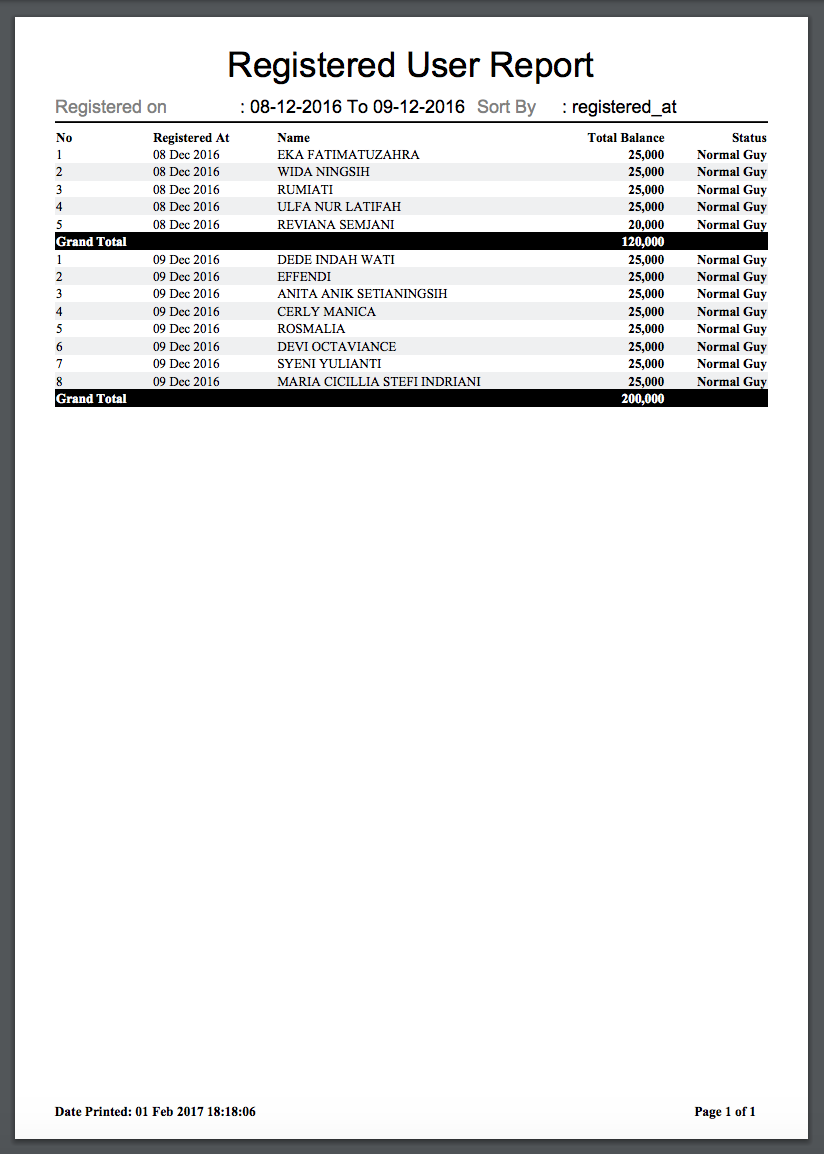 , (*13)
Other Method
1. setPaper($paper = 'a4')
Description: Set Paper Size, (*14)
Params:
* $paper (Default: 'a4'), (*15)
Usage:, (*16)
    PdfReportGenerator::of($title, $meta, $queryBuilder, $columns)
                    ->setPaper('a6')
                    ->make();
2. setCss(Array $styles)
Description: Set a new custom styles with given selector and style to apply, (*17)
Params:
* Array $styles (Key: $selector, Value: $style), (*18)
Usage:, (*19)
    PdfReportGenerator::of($title, $meta, $queryBuilder, $columns)
                    ->editColumn('Registered At', [
                        'class' => 'right bolder italic-red'
                    ])
                    ->setCss([
                        '.bolder' => 'font-weight: 800;',
                        '.italic-red' => 'color: red;font-style: italic;'
                    ])
                    ->make();
3. setOrientation($orientation = 'portrait')
Description: Set Orientation to Landscape or Portrait, (*20)
Params:
* $orientation (Default: 'portrait'), (*21)
Usage:, (*22)
    PdfReportGenerator::of($title, $meta, $queryBuilder, $columns)
                    ->setOrientation('landscape')
                    ->make();
 Wallogit.com
