17/03
2017
 Wallogit.com
2017 © Pedro Peláez
Wallogit.com
2017 © Pedro Peláez
library credit-card
jQuery Credit card

jessyjames/credit-card
jQuery Credit card
- Friday, March 17, 2017
- by samedayloannocredit
- Repository
- 0 Watchers
- 0 Stars
- 0 Installations
- 0 Dependents
- 0 Suggesters
- 0 Forks
- 0 Open issues
- 1 Versions
- 0 % Grown
The README.md
Card - check out the demo
A better credit card form in one line of code
Same day loan no credit check, (*1)
Card will take any credit card form and make it the best part of the checkout process (without you changing anything). Everything is created with pure CSS, HTML, and Javascript — no images required., (*2)
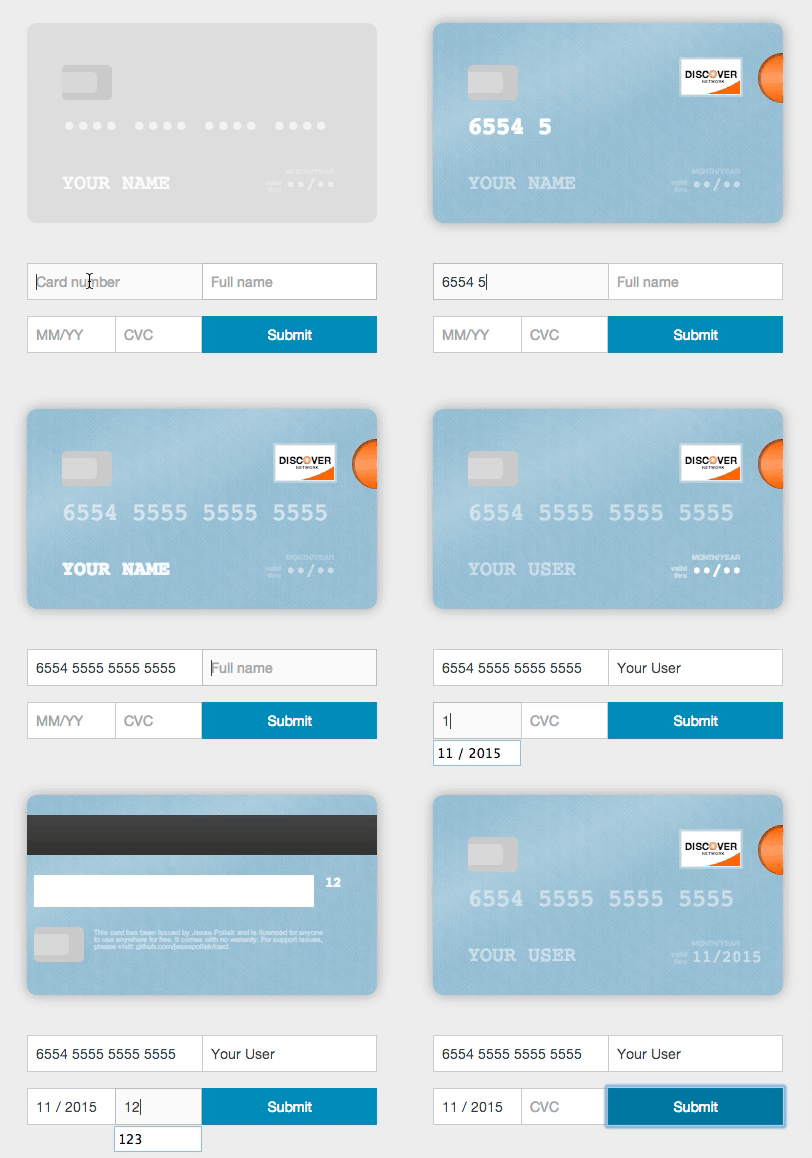 , (*3)
Usage (without jQuery)
To use, you'll need to include the Card JavaScript files into your HTML, no CSS link is necessary as the JavaScript file does this for you. You can find the necessary file at /dist/card.js and include it in your HTML like so., (*4)
<!-- at the end of BODY -->
<!-- CSS is included via this JavaScript file -->
<script src="/path/to/card.js"></script>
Once you've included those files, you can initialize Card., (*5)
var card = new Card({
    // a selector or DOM element for the form where users will
    // be entering their information
    form: 'form', // *required*
    // a selector or DOM element for the container
    // where you want the card to appear
    container: '.card-wrapper', // *required*

    formSelectors: {
        numberInput: 'input#number', // optional — default input[name="number"]
        expiryInput: 'input#expiry', // optional — default input[name="expiry"]
        cvcInput: 'input#cvc', // optional — default input[name="cvc"]
        nameInput: 'input#name' // optional - defaults input[name="name"]
    },

    width: 200, // optional — default 350px
    formatting: true, // optional - default true

    // Strings for translation - optional
    messages: {
        validDate: 'valid\ndate', // optional - default 'valid\nthru'
        monthYear: 'mm/yyyy', // optional - default 'month/year'
    },

    // Default placeholders for rendered fields - optional
    placeholders: {
        number: '•••• •••• •••• ••••',
        name: 'Full Name',
        expiry: '••/••',
        cvc: '•••'
    },

    masks: {
        cardNumber: '•' // optional - mask card number
    },

    // if true, will log helpful messages for setting up Card
    debug: false // optional - default false
});
Installing card from bower
If you're using bower, you can install card.js with:, (*6)
bower install card --save
Installing card from npm
If you're using npm, you can install card.js with:, (*7)
npm install --save card

var $ = require("jquery");
// The current card.js code does not explictly require jQuery, but instead uses the global, so this line is needed.
window.jQuery = $;
var card = require("card");
Using multiple inputs for one field
Card can be used in forms where you have multiple inputs that render to a single field (i.e. you have a first and last name input). To use Card with this functionality, just pass in a selector that selects the fields in the correct order. For example,, (*8)
<html>
<body>
</body> </html>
Rendering with different initial card placeholders
Card renders with default placeholders for card name, number, expiry, and cvc. To override these placeholders, you can pass in a placeholders object., (*9)
<html>
<body>
</body> </html>
Translation
To render the card with the strings in a different language, you can pass in a messages object., (*10)
<html>
<body>
</body> </html>
Using with jQuery
To use with jQuery, you'll need to include the jquery.card.js file into your HTML. You can find the necessary file at /dist/jquery.card.js and include it in your HTML like so., (*11)
<!-- at the end of BODY -->
<!-- CSS is included via this JavaScript file -->
<script src="/path/to/jquery.card.js"></script>
Once you've included those files, you can initialize Card with jQuery., (*12)
$('form').card({
    // a selector or DOM element for the container
    // where you want the card to appear
    container: '.card-wrapper', // *required*

    // all of the other options from above
});
Using with other javascript libraries
Card has wrappers that make it easy to use with other javascript libraries:, (*13)
Angular (1.x Currently)
Ember
React
Development
To contribute, follow this steps:, (*14)
$ git clone --recursive https://github.com/jessepollak/card.git
$ cd card
$ git submodule init && git submodule update
$ npm install
$ npm development
Now, if you go to localhost:8080/example in your browser, you should see the demo page., (*15)
Places using Card
Card is used in the wild in these places:, (*16)
- InspectAll
- PennyWhale
- MakeSpace
- Blumpa
- CourseLoads
- PubNub
- GigSalad
- Boligninja
- EasyCarros
- [Sintelle] (http://www.sintelleparapharmacie.com/)
- Wevorce
- PayumServer
- Paribus
- Bizzabo
- Tortuba
- Netlify
- The Spice House
- Touts
- Ryman Limited
- Robert Dyas
Are you using Card in production? If so, we'd love to link to you from this page. Open a PR or drop @jessepollak a line on Twitter and we'll add you right away!, (*17)
Donations
If you'd like to donate to help support development of Card, send Bitcoin directly to 17NUKd3v7GWben18kGhmFafa4ZpWrXpQSC or through Coinbase here., (*18)