# Ghastly


 , (*1)
Ghastly is a minimal static blog engine that emphasizes the use of themes and plugins. Get a blog up and running in seconds, then customize it with plugins and themes., (*2)
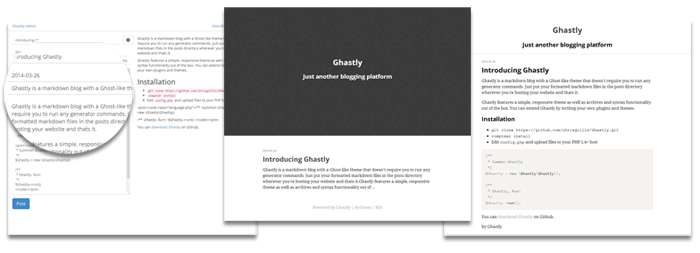 , (*3)
Installation
Ghastly requires PHP 5.4+., (*4)
git clone http://github.com/ghastlyblog/ghastly
cd ghastly
composer install
cp config.sample.php config.php
Edit config.php and you're done., (*5)
If you're installing in a sub directory, add RewriteBase /path/to/dir to .htaccess., (*6)
Ghastly ships with the following plugins enabled: Archive, Rss, Admin., (*7)
Posting
Create posts in posts/ in the format of 2014-12-28-my-blog-post-title.md. If you have the Admin plugin installed, you can login at http://localhost/admin., (*8)
A post should have a jekyll-like front matter. An example post would look like:, (*9)
---
title: My blog post title!
summary: A short summary about this post
tags: something, stuff
---

Lorem ipsum dolor sit amet...
Front Matter Items
| Option |
Explanation |
| title |
The title of your blog post |
| summary |
A summary of your blog post |
| tags |
A comma seperated list of tags for a post |
Installing new Plugins and Themes
Ghastly plugins and themes are available via Composer. Add them to your composer.json and run composer update., (*10)
Developing Themes
Ghastly uses the spooky theme by default. You can copy it to a folder and rename it to something else to make your own theme. You can modify the html files however you like. Ghastly uses the Twig template engine., (*11)
Your template must have a layout.html file and a single_post_layout.html file., (*12)
Template Variables
Ghastly exposes the following variables for you to use in your templates:, (*13)
| Variable |
Explanation |
posts |
This is an array of posts |
post |
A single post |
post.date |
The date of a post |
post.tags |
The tags of a post |
post.title |
The title of a post |
post.summary |
The summary of a post if supplied through front matter |
post.content |
The html content of a post |
All of the options in config.php are available as template variables., (*14)
Publishing your theme for others
Your theme must be in a repository and it must contain a composer.json file that references a type of ghastly-theme and must require ghastly/theme-installer as a dependency. Your repository must also be available on Packagist. If your theme requires any plugins, list those as dependencies as well., (*15)
{
    "name" : "ghastly/spooky",
    "description" : "An excellent theme for Ghastly",
    "type" : "ghastly-theme",
    "license" : "UNLICENSE",
    "require" : {
        "ghastly/theme-installer" : "dev-master",
        "ghastly/archive" : "dev-master"
    }
}
````

## Developing Plugins

Before you embark on creating Ghastly plugins, be aware that the plugin API is likely going to be changing a lot as I play around with it.

Create a class that extends `Plugin` and put it in a folder with a name the same as the class you just created. . Your class should populate a public class property `$this->events` with any events the plugin will subscribe to.

```php
class Archive extends \Ghastly\Plugin\Plugin {
    public $events;
    public function __construct()
    {
        $this->events = [
            ['event'=>'Ghastly.PreRoute', 'func'=>'onPreRoute'],
            ['event'=>'Ghastly.PreRender', 'func'=>'onPreRender']
        ];
    }
}
The plugin constructor can also accept a $config array if the user adds a configuration array for your plugin in their config.php., (*16)
Add the plugin to the plugins config option in config.php to enable it., (*17)
| Event |
Event Properties |
Ghastly.PreRoute |
Make your plugin respond to routes |
Ghastly.PreRender |
Inject template variables prior to rendering |
Note that all events are passed an instance of $Ghastly., (*18)
Ghastly.PreRoute
Exposes: $router, $postModel, $renderer, (*19)
Your Ghastly plugin can respond to routes by subscribing to this event. Example:, (*20)
class Hello extends \Ghastly\Plugin\Plugin {
    public $events;
    public function __construct()
    {
        $this->events = [
            ['event'=>'Ghastly.PreRoute', 'func'=>'onPreRoute'],
        ];
    }

    public function onPreRoute(\Ghastly\Event\PreRouteEvent $event){
        $event->router->respond('/some_route', function() use ($event){
            $event->renderer->setTemplateVar('greeting', 'Hello World!');
            $event->renderer->addTemplateDir('plugins/hello');
            $event->renderer->setTemplate('hello_world.html');
        });
    }
}
The hello_world.html template now has {{ greeting }} available to it when Ghastly is responding to some_route. You can modify existing template variables in the same manner., (*21)
Ghastly.PreRender
Exposes: $renderer, $postModel, (*22)
This event lets you modify the Ghastly instance on any route after it and all plugins have responded to the route., (*23)
Event Objects
The $event object passed to your event function contains several useful objects:, (*24)
$renderer
$renderer->addTemplateDir($str) - add a directory to the renderer to search for additional templates
$renderer->addTemplateVar($key,$val) - add a template variable
$renderer->setTemplate($str) - set the template ghastly will render, (*25)
$postModel
$postModel->findAll($limit) - will retrieve $limit posts and parse them
$postModel->findAllHeaders($limit) - will retrieve $limit posts but without getting the file contents
$postModel->getPostById($id) - will retrieve a single parsed post, $id should be a slug, (*26)
$router
A Klein instance. See their documentation. Use it for responding to new routes., (*27)
Publishing your plugin for others
Your plugin must be in a repository and it must contain a composer.json file that references a type of ghastly-plugin and must require ghastly/plugin-installer as a dependency. Your repository must also be available on Packagist, (*28)
    {
        "name" : "ghastly/archive",
        "description" : "An archive plugin for Ghastly",
        "type" : "ghastly-plugin",
        "license" : "UNLICENSE",
        "require" : {
            "ghastly/plugin-installer" : "dev-master"
        }
    }
Contributing
Bring on the pull requests. I'm open to your ideas and suggestions. If you want to be very active, I can add you to the team., (*29)
Unit tests exist in Ghastly/Test. To run them, execute vendor/bin/phpunit., (*30)
 Wallogit.com
