ZFDebug - a debug bar for Zend Framework
ZFDebug is a plugin for the Zend Framework for PHP5, providing useful debug information displayed in a small bar at the bottom of every page., (*1)
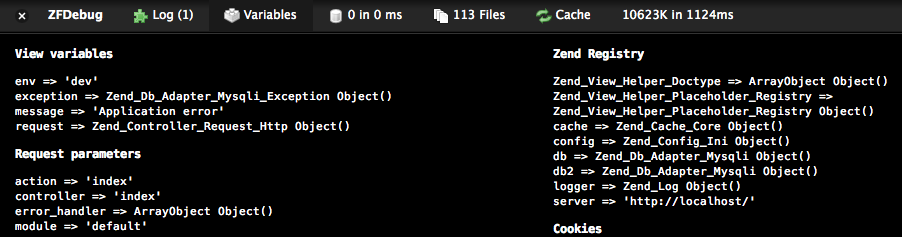
Time spent, memory usage and number of database queries are presented at a glance. Additionally, included files, a listing of available view variables and the complete SQL command of all queries are shown in separate panels:, (*2)
 , (*3)
The available plugins at this point are:, (*4)
- Cache: Information on Zend_Cache, APC and Zend OPcache (for PHP 5.5).
- Database: Full listing of SQL queries from Zend_Db and the time for each.
- Exception: Error handling of errors and exceptions.
- File: Number and size of files included with complete list.
- Html: Number of external stylesheets and javascripts. Link to validate with W3C.
for custom memory measurements.
- Log: Timing information of current request, time spent in action controller and custom timers. Also average, min and max time for requests.
- Variables: View variables, request info and contents of
$_COOKIE, $_POST and $_SESSION
- Session
Installation & Usage
To install, place the folder 'ZFDebug' in your library path, next to the Zend
folder. Then add the following method to your bootstrap class (in ZF1.8+):, (*5)
protected function _initDebug()
{
    $autoloader = Zend_Loader_Autoloader::getInstance();
    $autoloader->registerNamespace('ZFDebug');

    $options = array(
        'plugins' => array('Variables',
                           'Database' => array('adapter' => $db),
                           'File' => array('basePath' => '/path/to/project'),
                           'Cache' => array('backend' => $cache->getBackend()),
                           'Exception')
    );
    $debug = new ZFDebug_Controller_Plugin_Debug($options);

    $this->bootstrap('frontController');
    $frontController = $this->getResource('frontController');
    $frontController->registerPlugin($debug);
}
Doctrine 1 Plugin
Here is example configuration for using the Doctrine Plugin:, (*6)
protected function _initDebug()
{
    if (APPLICATION_ENV === 'development') {
        $options = array(
            'plugins' => array(
                'Variables',
                'File',
                'Memory',
                'Time',
                new ZFDebug_Controller_Plugin_Debug_Plugin_Doctrine(),
                'Exception'
            )
        );

        $ZFDebug = new ZFDebug_Controller_Plugin_Debug($options);
        $frontController = Zend_Controller_Front::getInstance();
        $frontController->registerPlugin($ZFDebug);

        return $ZFDebug;
    }
}
Doctrine2 Plugin
Here is example configuration for using the Doctrine2 Plugin:, (*7)
protected function _initDebug()
{
    if (APPLICATION_ENV === 'development') {
        $autoloader = Zend_Loader_Autoloader::getInstance();
        $autoloader->registerNamespace('ZFDebug');
        $em = $this->bootstrap('doctrine')->getResource('doctrine')->getEntityManager();
        $em->getConnection()->getConfiguration()->setSQLLogger(new \Doctrine\DBAL\Logging\DebugStack());

        $options = array(
            'plugins' => array(
                'Variables',
                'ZFDebug_Controller_Plugin_Debug_Plugin_Doctrine2'  => array(
                    'entityManagers' => array($em),
                ),
                'File'          => array('base_path' => APPLICATION_PATH . '/application'),
                //'Cache'       => array('backend' => $cache->getBackend()),
                'Exception',
                'Html',
                'Memory',
                'Time',
                'Registry',
            )
        );

        $debug = new ZFDebug_Controller_Plugin_Debug($options);
        $this->bootstrap('frontController');
        $frontController = $this->getResource('frontController');
        $frontController->registerPlugin($debug);
    }
}
Some use case will require that you set up callback functions. Especially, these happen to occur in the following plugins:
- cache: the callback function is called when asked to clean the cache
- language: the callback is called when we try to change the active language
- auth: the callback is used to retrieve the real username when the default plugin would only give an id, (*8)
You can leverage those functionalities by setting the following class:, (*9)
<?php
class Yujia_Controller_Plugin_Debug extends ZFDebug_Controller_Plugin_Debug
{
    public function __construct($options = null)
    {
        // avoids constructing before required vars are available
    }

    public function preDispatch(Zend_Controller_Request_Abstract $request)
    {
        if (APPLICATION_ENV !== 'production') {

            $auth_callback = function ($raw_user) {
                // do the job for getting the real username from the raw data you would typically retrieve
            };

            $locale_callback = function () {
                // do the job for changing locale
            };

            $cache_callback = function () {
                // do the job for clearing the cache
            };

            $this->_options = array(
                'image_path' => null,
                'plugins' =>
                    array(
                        'Variables',
                        'ZFDebug_Controller_Plugin_Debug_Plugin_Doctrine2'  => array(
                            'entityManagers' => array(\Zend_Registry::get('em')),
                        ),
                        'File' => array('base_path' => APPLICATION_PATH . '/../'),
                        'Cache' => array('backend' => 'Zend_Cache', 'callback' => $cache_callback),
                        'Exception',
                        'Html',
                        'Locale' => array('callback' => $locale_callback),
                        'Auth' => array('user' => 'id', 'callback' => $auth_callback),
                    )
            );
            // Registering Debug plugin
            parent::__construct();
        }
    }
}
Using Composer
You may now install ZFDebug using the dependency management tool Composer., (*10)
To use ZFDebug with Composer, add the following to the require list in your
project's composer.json file:, (*11)
"require": {
    "frejfrej/zfdebug": "1.6.2"
},
Run the install command to resolve and download the dependencies:, (*12)
php composer.phar install
Further documentation will follow as the github move progresses., (*13)
 Wallogit.com

 aur1mas
 reneaigle