2017 © Pedro Peláez
 

library firadmin

Basic admin panel for Laravel 4 with login and user controller implementation

image

firalabs/firadmin

Basic admin panel for Laravel 4 with login and user controller implementation

  • Thursday, December 18, 2014
  • by firalabs
  • Repository
  • 0 Watchers
  • 0 Stars
  • 545 Installations
  • 0 Dependents
  • 0 Suggesters
  • 0 Forks
  • 0 Open issues
  • 10 Versions
  • 0 % Grown

The README.md

!!! DEPRECATED !!!

This package is no longer actively maintained. The next version of Laravel 5 should propably contain all basic stuff you need to start a admin panel., (*1)

Firadmin

Laravel 4 package used to create a beautiful admin panel with default user managment. This package is currently under active development, following Laravel 4., (*2)

Build Status Total Downloads Latest Stable Version, (*3)

Features

  • Resourceful User management with roles permissions
  • Base controller use for admin panel development
  • ACL component for privilege management
  • Complete UI admin panel using Twitter Bootstrap 2.3
  • Complete login component with password reset and reminder
  • Easily configurable

Installation

For laravel 4.0 use firadmin version 1.0.* and for laravel 4.1 use firadmin version 1.1.* and above., (*4)

Begin by installing this package through Composer. Edit your project's composer.json file to require firalabs/firadmin., (*5)

{
    "require": {
        "firalabs/firadmin": "dev-master"
    }
}

Update your packages with composer update or install with composer install., (*6)

Once this operation completes, you need to add the service provider. Open app/config/app.php, and add a new item to the providers array., (*7)

Firalabs\Firadmin\FiradminServiceProvider

Documentation

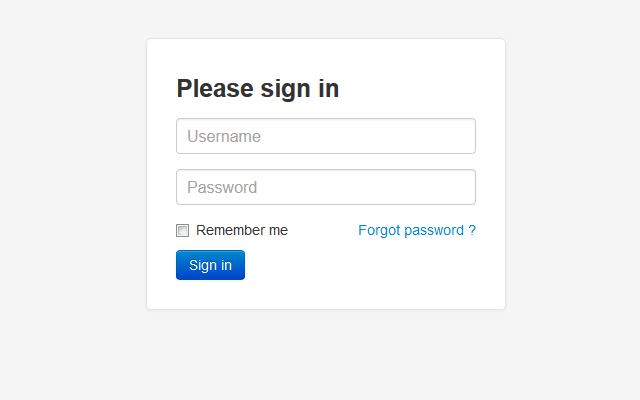
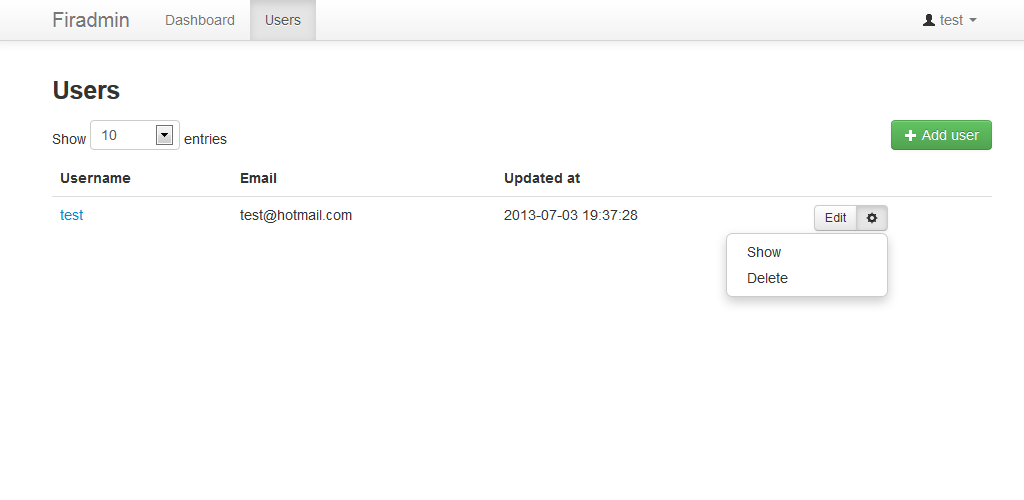
Screenshots

firadmin login firadmin user-admin, (*8)

Configurations

To configure the package to meet your needs, you must publish the configuration in your application before you can modify them. Run this artisan command., (*9)

php artisan config:publish firalabs/firadmin

The configuration files could now be found in app/config/packages/firalabs/firadmin. Read the description for each configurations to know what you can override., (*10)

Binding models

You need to bind a user and a user role model to your application. By default, the package already provide those. Add this few lines in app/start/global.php, (*11)

/*
|--------------------------------------------------------------------------
| Application IoC Container binding
|--------------------------------------------------------------------------
|*/
App::bind('Firalabs\Firadmin\Repository\UserRepositoryInterface', 'Firalabs\Firadmin\Repository\Eloquent\UserRepository'); //User model
App::bind('Firalabs\Firadmin\Repository\UserRoleRepositoryInterface', 'Firalabs\Firadmin\Repository\Eloquent\UserRoleRepository'); //User role model

After that, you must set the same user repository has a model in app/config/auth.php, (*12)

'model' => 'Firalabs\Firadmin\Repository\Eloquent\UserRepository'

Migrations

If you use the default models provided in the package, you must run this migration commands., (*13)

php artisan auth:reminders
php artisan migrate
php artisan migrate --package="firalabs/firadmin"

Create default user

You need to have at least one register user in your database. We provided a easy way to create a user using artisan command. Use --role=""administrator"" when setting up a user for the first time., (*14)

php artisan create:user [--role[="..."]] username email password

You can also change the role names Firadmin checks on app/config/packages/firalabs/firadmin/config.php., (*15)

'roles' => array(
    /*
     * Grant all privileges to the administrator roles.
     */
    'administrator'  => true,

    /*
     * Granted basics CRUD privileges to the user administrator role on the user resource.
     */
    'user_administrator' => array('user' => array('create', 'read', 'update', 'delete'))
)

Register dashboard controller

You must set a route to the dashboard admin panel in app/routes.php. We provide a default dashboard controller for testing purpose., (*16)

/*
|--------------------------------------------------------------------------
| Register admin controllers
|--------------------------------------------------------------------------
*/
Route::group(array ('before' => 'auth', 'prefix' => 'admin' ), function ()
{   
    Route::get('/', 'Firalabs\Firadmin\Controllers\DashboardController@getIndex');
});

Facades

We have two available facades: * Permissions * AjaxRequest, (*17)

You can add this facade to your app/config/app.php file., (*18)

array(
    'aliases' => array(
        'AjaxRequest' => 'Firalabs\Firadmin\Facades\AjaxRequest',
        'Permissions' => 'Firalabs\Firadmin\Facades\Permissions'
    )
);

Permissions

To handle privileges on the current logged user, simply use this code in your controller action method.., (*19)

//Check permission
if(Permissions::isAllowed(Auth::user(), 'user', 'read') !== true){
    return Redirect::route('login')
        ->with('reason', Lang::get('firadmin::admin.messages.insufficient-permission') . '<br>')
        ->with('error', 1);
}

Ajax Request

Documentation coming soon ..., (*20)

Admin controller development

When you want to create a new admin controller, simply extend the BaseController provide in the package. Is a example of a dashboard controller create in the folder app/controllers/Admin/DashboardController.php, (*21)

<?php

use Firalabs\Firadmin\Controllers\BaseController;

/**
 * Default dashboard controller
 */
class Admin_DashboardController extends BaseController {

    /**
     * The current active menu URI
     * 
     * @var string
     */
    public $active_menu = 'admin';

    /**
     * Get the dashboard
     */
    public function getIndex()
    {
        //Set layout content
        $this->layout->content = View::make('firadmin::dashboard');
    }
}

Custom models repositories

You can directly extend those in the packages or simply implement the interfaces provided in Firalabs\Firadmin\Repository., (*22)

Enjoy !!

You admin panel is now configured. Just go to http://localhost/admin to access the admin panel., (*23)

Feel free to contact me !!!, (*24)

The Versions

18/12 2014

dev-master

9999999-dev

Basic admin panel for Laravel 4 with login and user controller implementation

  Sources   Download

The Requires


The Development Requires

laravel user login privilege admin cpanel managment

28/04 2014

1.2.0

1.2.0.0

Basic admin panel for Laravel 4 with login and user controller implementation

  Sources   Download

The Requires


The Development Requires

laravel user login privilege admin cpanel managment

24/01 2014

1.1.1

1.1.1.0

Basic admin panel for Laravel 4 with login and user controller implementation

  Sources   Download

The Requires


The Development Requires

laravel user login privilege admin cpanel managment

24/01 2014

dev-develop

dev-develop

Basic admin panel for Laravel 4 with login and user controller implementation

  Sources   Download

The Requires


The Development Requires

laravel user login privilege admin cpanel managment

14/01 2014

1.1.0

1.1.0.0

Basic admin panel for Laravel 4 with login and user controller implementation

  Sources   Download

The Requires


The Development Requires

laravel user login privilege admin cpanel managment

04/01 2014

1.0.4

1.0.4.0

Basic admin panel for Laravel 4 with login and user controller implementation

  Sources   Download

The Requires


The Development Requires

laravel user login privilege admin cpanel managment

08/09 2013

1.0.3

1.0.3.0

Basic admin panel for Laravel 4 with login and user controller implementation

  Sources   Download

The Requires


The Development Requires

laravel user login privilege admin cpanel managment

02/07 2013

1.0.2

1.0.2.0

Basic admin panel for Laravel 4 with login and user controller implementation

  Sources   Download

The Requires


The Development Requires

laravel user login privilege admin cpanel managment

10/06 2013

1.0.1

1.0.1.0

Basic admin panel for Laravel 4 with login and user controller implementation

  Sources   Download

The Requires


The Development Requires

laravel user login privilege admin cpanel managment

07/06 2013

1.0.0

1.0.0.0

Basic admin panel for Laravel 4 with login and user controller implementation

  Sources   Download

The Requires


The Development Requires

laravel user login privilege admin cpanel managment